> ## Documentation Index
> Fetch the complete documentation index at: https://grandcentral.backbase.io/llms.txt
> Use this file to discover all available pages before exploring further.
# Sync Hub deployment and configuration
> Manage Azure Service Bus topics and subscriptions, then deploy and configure the Sync Hub producer and consumer
This page is the operational guide for running Sync Hub. It covers how to:
* Manage Azure Service Bus topics and subscriptions through GitOps.
* Deploy and configure the Sync Hub **producer**, which publishes events.
* Deploy and configure the Sync Hub **consumer**, which forwards events to APIM.
For the high-level concept and patterns, see [Sync Hub overview](/platform/sync-hub/overview) and [integration patterns](/platform/sync-hub/integration-patterns).
## Prerequisites
Before you start, make sure you have:
* Access to your organization's `gc-${org}-applications-live` repository.
* ArgoCD and Azure Service Operator (ASO) deployed in the target runtime.
* Access to the shared ACR (`gcshared671.azurecr.io/charts`) for Helm charts.
* An Azure Service Bus namespace with managed identity configured.
* Network connectivity between the runtime cluster, Azure Service Bus, and APIM.
## How the pieces fit together
Source connector → **Producer** → **Azure Service Bus topic / subscription** → **Consumer** → APIM → Backbase Unified APIs.
Topics and subscriptions are infrastructure that you manage declaratively using Git and ArgoCD. The producer and consumer are Spring Boot services that you deploy as Helm charts.
## Topic and subscription management
You manage topics and subscriptions in the **`gc-${org}-applications-live`** repository under each runtime directory. The `synchub` folder contains the Azure Service Bus configuration for that runtime in `servicebus.values.yaml`.
**ArgoCD** automates the continuous deployment of Azure Service Bus custom resources through **Azure Service Operator (ASO)**.
### Location of the configuration
Each runtime stores the file at:
```text theme={"system"}
https://github.com/bb-ecos-${org}/gc-${org}-applications-live/tree/main/runtimes/${runtime}/synchub/servicebus.values.yaml
```
Replace `${org}` with your organization and `${runtime}` with the target runtime.
To add a new topic or subscription, add the configuration in the `servicebus.values.yaml` file under the `synchub` folder for the target runtime.
### Configuration schema
The configuration supports a number of optional and required parameters for topics and subscriptions:
```yaml theme={"system"}
topics:
- name: default # Must-Be-Changed
maxSizeInMegabytes: 5120 # Optional-To-Change
autoDeleteOnIdle: "" # Optional-To-Change
enablePartitioning: false # Optional-To-Change
supportOrdering: false # Optional-To-Change
subscriptions:
- name: sub1 # Must-Be-Changed
maxDeliveryCount: 10 # Optional-To-Change
requiresSession: true # Optional-To-Change
autoDeleteOnIdle: "" # Optional-To-Change
defaultMessageTimeToLive: "P14D" # Optional-To-Change
deadLetteringOnMessageExpiration: true # Optional-To-Change
lockDuration: "PT1M" # Optional-To-Change
deadLetteringOnFilterEvaluationExceptions: false # Optional-To-Change
```
The file can contain one or more topics, and each topic can include one or more subscriptions.
### Example configuration
The following example creates a `payment-status-mb-dev` topic on Azure Service Bus with a `payment-order-service` subscription that has sessions turned off:
```yaml theme={"system"}
---
topics:
- name: payment-status-mb-dev
maxSizeInMegabytes: 5120
autoDeleteOnIdle: ""
enablePartitioning: false
supportOrdering: false
subscriptions:
- name: payment-order-service
maxDeliveryCount: 10
requiresSession: false
autoDeleteOnIdle: ""
defaultMessageTimeToLive: "P14D"
deadLetteringOnMessageExpiration: true
lockDuration: "PT1M"
deadLetteringOnFilterEvaluationExceptions: false
```
The preceding example produces a topic and subscription that look like this on Azure Service Bus:
 ### How ArgoCD applies changes
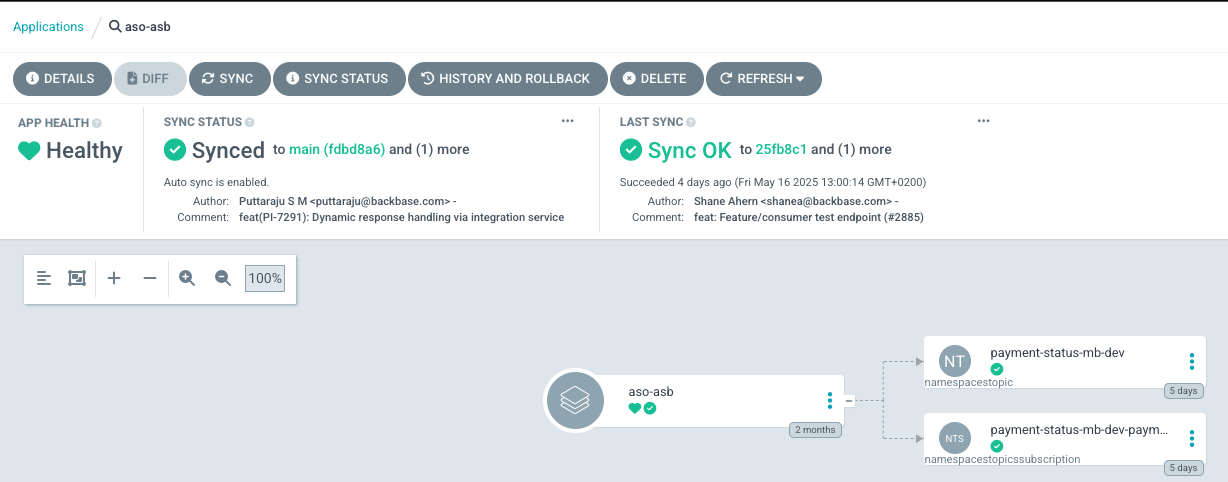
After you merge the change, ArgoCD picks it up and applies it through Azure Service Operator. To monitor the change, check the `aso-asb` app in Argo for the runtime.
### How ArgoCD applies changes
After you merge the change, ArgoCD picks it up and applies it through Azure Service Operator. To monitor the change, check the `aso-asb` app in Argo for the runtime.
 ## Producer deployment and configuration
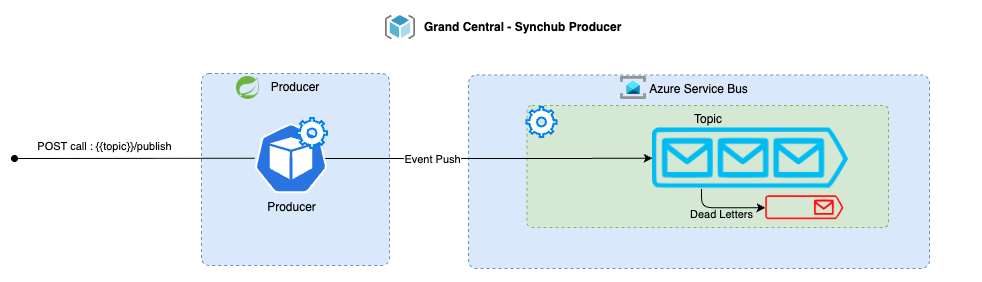
The Sync Hub producer is a platform component that publishes payloads to topics on Azure Service Bus. It uses Spring Boot and the Azure Service Bus SDK.
## Producer deployment and configuration
The Sync Hub producer is a platform component that publishes payloads to topics on Azure Service Bus. It uses Spring Boot and the Azure Service Bus SDK.
 ### Deploy the producer
Deploy the producer to a Sync Hub-enabled environment through `gc-${org}-applications-live`, the same way as any connector.
Use the chart versions available under the shared ACR:
```yaml theme={"system"}
- repoURL: gcshared671.azurecr.io/charts
chart: asb-producer
```
The following example Application file goes under `gc-${org}-applications-live/${runtime}/apps/`:
```yaml theme={"system"}
---
apiVersion: argoproj.io/v1alpha1
kind: Application
metadata:
name: synchub-producer
namespace: argocd
spec:
project: grandcentral
destination:
server: https://kubernetes.default.svc
namespace: synchub-producer
sources:
- repoURL: git@github.com:gc-devops-${org}/gc-${org}-applications-live.git
targetRevision: main
ref: apps-live
- repoURL: gcshared671.azurecr.io/charts
chart: asb-producer
targetRevision: "${CHART_VERSION}"
helm:
releaseName: asb-producer
valueFiles:
- $apps-live/runtimes/${runtime}/values/synchub-producer/producer.values.yaml
syncPolicy:
automated:
prune: true
allowEmpty: true
selfHeal: true
syncOptions:
- CreateNamespace=false
```
Replace `${CHART_VERSION}` with the `asb-producer` chart version available in your shared ACR.
### Required producer configuration
The producer uses the following configuration properties to communicate with Azure Service Bus.
#### `backbase.grandcentral.events.servicebus.fullyQualifiedNamespace`
Sets the `fullyQualifiedNamespace` of the Azure Service Bus to connect to. Format: `my-sb-namespace.servicebus.windows.net`.
#### `backbase.grandcentral.events.servicebus.activeTopics`
Lists the topics this producer instance can publish messages to. At least one active topic must be present, otherwise the producer fails on startup.
Example value:
```yaml theme={"system"}
backbase.grandcentral.events.servicebus.activeTopics: "payment-status-mb-dev, account-mb-dev"
```
#### `backbase.grandcentral.events.servicebus.sessionGroups.${topic}`
Defines all session groups for a specific topic. Session groups ensure message ordering.
Example configuration for an `account` topic with two session groups:
```yaml theme={"system"}
backbase:
grandcentral:
events:
servicebus:
activeTopics: account
fullyQualifiedNamespace: ${FULLY_QUALIFIED_NAMESPACE}
sessionGroups:
account:
sessionList:
- session-account-1
- session-account-2
```
### Call the producer
#### Connector labels required
The producer accepts connections only through intra-cluster communication. Only connectors deployed in the same runtime can interact with it, and only after you configure these pod labels:
* `app.gcservices.io/synchub-enabled: "true"`
* `app.gcservices.io/synchub-type: "producer"`
The Helm plugin supports additional pod labels through `connector.customLabels`:
```yaml theme={"system"}
connector:
customLabels:
app.gcservices.io/synchub-enabled: "true"
app.gcservices.io/synchub-type: "producer"
```
#### Service URL
Resolve the producer using the Kubernetes FQDN. For the example Application file, the release name is `asb-producer`, so the producer service is available at:
```text theme={"system"}
http://asb-producer.synchub-producer.svc.cluster.local
```
#### Producer endpoint
The service exposes a `POST` endpoint for publishing to topics. Pass the topic name as a path variable.
The following table shows the producer endpoint pattern for each topic.
| URL | Action |
| :------------------------------------------------------------------------------ | :-------------------------------------- |
| `http://asb-producer.synchub-producer.svc.cluster.local/account/publish` | Publishes to the `account` topic |
| `http://asb-producer.synchub-producer.svc.cluster.local/payment-status/publish` | Publishes to the `payment-status` topic |
#### Required request headers
* `eventSource` - The source of the generated event.
* `eventVersion` - The version of the event.
* `identifier` - The unique identifier of the target resource.
* `traceParent` - The unique tracing ID.
#### Optional request headers
* `bbEventType` - Package path of the event handler used for Backbase SDK processing.
* `traceState` - Vendor-specific trace identification.
#### Example request
The following example shows the shape of a publish request. The `data` field contains the event payload, and its structure depends on the topic and event your connector publishes. The `paymentTransaction` payload is illustrative. Substitute the domain object that fits your event. For example, `account`, `customer`, or `loanApplication`.
```http theme={"system"}
POST http://asb-producer.synchub-producer.svc.cluster.local/account/publish
Content-Type: application/json
identifier: 123
eventSource: com.backbase.ebp.account
eventVersion: 1.0
bbEventType: com.backbase.payment.event.spec.v1.PaymentOrderStatusEvent
traceParent: 00-6debf1ea-652d-4f03-b3a5-01
traceState: idempotent_request_key='6debf1ea-652d-4f03-b3a5-c69b0d96208'
{
"eventSource": "com.backbase.ebp.account",
"eventVersion": "1.0",
"identifier": "123",
"dateTime": "2023-11-13T20:20:39+00:00",
"dataContentType": "application/json",
"traceParent": "00-6debf1ea-652d-4f03-b3a5-01",
"traceState": "idempotent_request_key='6debf1ea-652d-4f03-b3a5-c69b0d96208'",
"data": {
"paymentTransaction": {
"id": "BR12345678901234567890123456789012345678901234567890123456789012",
"paymentReference": "c10530e5-611d-43dc-b786-a26edb773985",
"uetr": "6debf1ea-652d-4f03-b3a5-c69b0d96208",
"type": "Wire",
"status": "REJECTED",
"scheduledExecutionDate": "2024-07-23T14:30:00Z",
"valueDate": "2024-07-24T14:30:00Z",
"deliveryDate": "2024-07-25T14:30:00Z",
"exchangeRate": {
"currency": "EUR",
"rate": 0.8457,
"isIndicative": false,
"contractId": "FCC-USD-9999222381"
},
"amount": 250.00,
"currency": "USD",
"customFields": {
"traceCode": "1212-1212121-12121212"
}
}
}
}
```
#### Call the producer from an inbound connector
An inbound connector doesn't need to construct the HTTP call by hand. You wire the connector to the producer through a small set of properties. The same code can then publish to any topic by changing configuration alone.
The following table describes the properties for wiring a connector to the producer.
| Property | Purpose |
| :-------------------- | :------------------------------------------------------------------------------------------------- |
| `asb.event.type` | Backbase event spec class for the payload. Corresponds to the `bbEventType` request header. |
| `asb.event.source` | Source domain that produced the event. Corresponds to the `eventSource` request header. |
| `asb.event.version` | Schema version of the event. Corresponds to the `eventVersion` request header. |
| `asb.event.topic` | Azure Service Bus topic to publish to. Forms the `{topic}` path variable in the producer endpoint. |
| `asb.producer.apiUri` | Base URL of the producer service in the same runtime. |
The connector builds the full endpoint as `${asb.producer.apiUri}/${asb.event.topic}/publish` and sets the three event headers from the matching `asb.event.*` properties on every publish.
The following example shows an inbound connector publishing party updates to the `party-updates` topic:
```properties theme={"system"}
asb.event.type=com.backbase.party.event.spec.v1.PartyUpdateEvent
asb.event.source=com.backbase.party
asb.event.version=1.0.0
asb.event.topic=party-updates
asb.producer.apiUri=http://asb-producer-v0.synchub-producer.svc.cluster.local
```
You still set per-request values such as `identifier` and `traceParent` on the outbound request itself, because they change for each event. The connector pod must also carry the labels described in [Connector labels required](#connector-labels-required) before it can call the producer.
## Consumer deployment and configuration
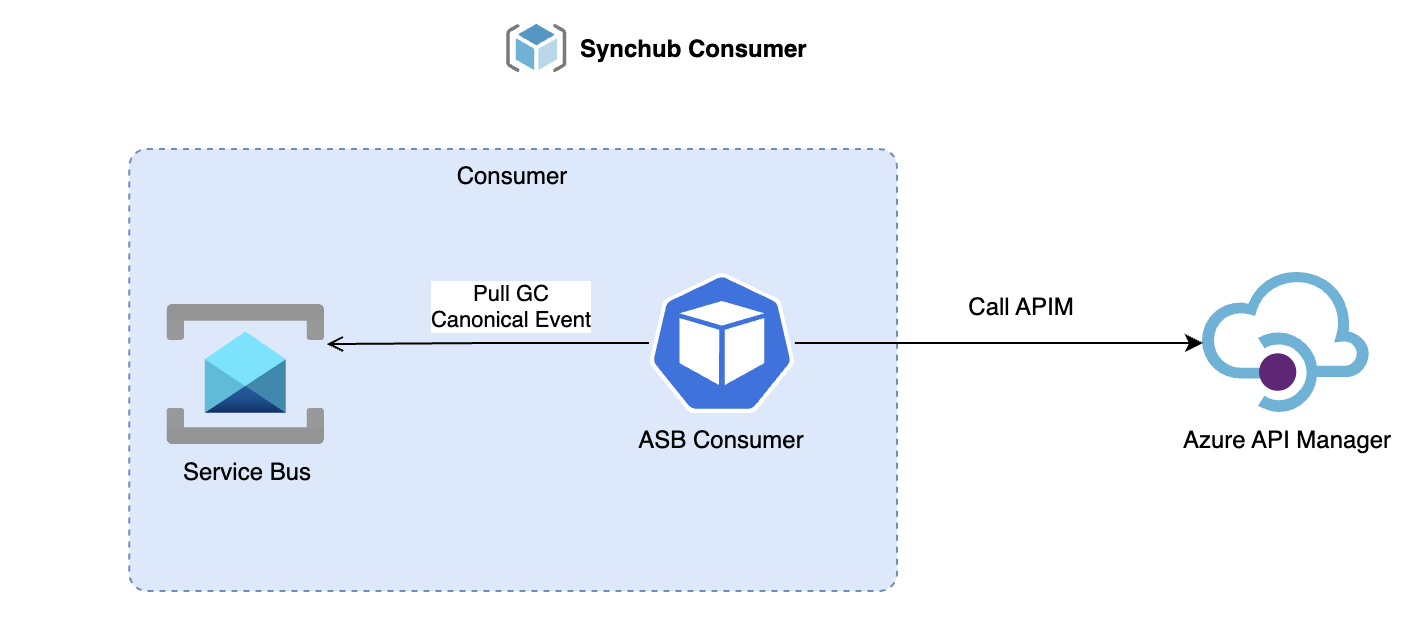
The Sync Hub consumer is a platform component that reads messages from Azure Service Bus and routes each message to APIM based on configuration. It uses Spring Boot and the Azure Service Bus SDK.
### Deploy the producer
Deploy the producer to a Sync Hub-enabled environment through `gc-${org}-applications-live`, the same way as any connector.
Use the chart versions available under the shared ACR:
```yaml theme={"system"}
- repoURL: gcshared671.azurecr.io/charts
chart: asb-producer
```
The following example Application file goes under `gc-${org}-applications-live/${runtime}/apps/`:
```yaml theme={"system"}
---
apiVersion: argoproj.io/v1alpha1
kind: Application
metadata:
name: synchub-producer
namespace: argocd
spec:
project: grandcentral
destination:
server: https://kubernetes.default.svc
namespace: synchub-producer
sources:
- repoURL: git@github.com:gc-devops-${org}/gc-${org}-applications-live.git
targetRevision: main
ref: apps-live
- repoURL: gcshared671.azurecr.io/charts
chart: asb-producer
targetRevision: "${CHART_VERSION}"
helm:
releaseName: asb-producer
valueFiles:
- $apps-live/runtimes/${runtime}/values/synchub-producer/producer.values.yaml
syncPolicy:
automated:
prune: true
allowEmpty: true
selfHeal: true
syncOptions:
- CreateNamespace=false
```
Replace `${CHART_VERSION}` with the `asb-producer` chart version available in your shared ACR.
### Required producer configuration
The producer uses the following configuration properties to communicate with Azure Service Bus.
#### `backbase.grandcentral.events.servicebus.fullyQualifiedNamespace`
Sets the `fullyQualifiedNamespace` of the Azure Service Bus to connect to. Format: `my-sb-namespace.servicebus.windows.net`.
#### `backbase.grandcentral.events.servicebus.activeTopics`
Lists the topics this producer instance can publish messages to. At least one active topic must be present, otherwise the producer fails on startup.
Example value:
```yaml theme={"system"}
backbase.grandcentral.events.servicebus.activeTopics: "payment-status-mb-dev, account-mb-dev"
```
#### `backbase.grandcentral.events.servicebus.sessionGroups.${topic}`
Defines all session groups for a specific topic. Session groups ensure message ordering.
Example configuration for an `account` topic with two session groups:
```yaml theme={"system"}
backbase:
grandcentral:
events:
servicebus:
activeTopics: account
fullyQualifiedNamespace: ${FULLY_QUALIFIED_NAMESPACE}
sessionGroups:
account:
sessionList:
- session-account-1
- session-account-2
```
### Call the producer
#### Connector labels required
The producer accepts connections only through intra-cluster communication. Only connectors deployed in the same runtime can interact with it, and only after you configure these pod labels:
* `app.gcservices.io/synchub-enabled: "true"`
* `app.gcservices.io/synchub-type: "producer"`
The Helm plugin supports additional pod labels through `connector.customLabels`:
```yaml theme={"system"}
connector:
customLabels:
app.gcservices.io/synchub-enabled: "true"
app.gcservices.io/synchub-type: "producer"
```
#### Service URL
Resolve the producer using the Kubernetes FQDN. For the example Application file, the release name is `asb-producer`, so the producer service is available at:
```text theme={"system"}
http://asb-producer.synchub-producer.svc.cluster.local
```
#### Producer endpoint
The service exposes a `POST` endpoint for publishing to topics. Pass the topic name as a path variable.
The following table shows the producer endpoint pattern for each topic.
| URL | Action |
| :------------------------------------------------------------------------------ | :-------------------------------------- |
| `http://asb-producer.synchub-producer.svc.cluster.local/account/publish` | Publishes to the `account` topic |
| `http://asb-producer.synchub-producer.svc.cluster.local/payment-status/publish` | Publishes to the `payment-status` topic |
#### Required request headers
* `eventSource` - The source of the generated event.
* `eventVersion` - The version of the event.
* `identifier` - The unique identifier of the target resource.
* `traceParent` - The unique tracing ID.
#### Optional request headers
* `bbEventType` - Package path of the event handler used for Backbase SDK processing.
* `traceState` - Vendor-specific trace identification.
#### Example request
The following example shows the shape of a publish request. The `data` field contains the event payload, and its structure depends on the topic and event your connector publishes. The `paymentTransaction` payload is illustrative. Substitute the domain object that fits your event. For example, `account`, `customer`, or `loanApplication`.
```http theme={"system"}
POST http://asb-producer.synchub-producer.svc.cluster.local/account/publish
Content-Type: application/json
identifier: 123
eventSource: com.backbase.ebp.account
eventVersion: 1.0
bbEventType: com.backbase.payment.event.spec.v1.PaymentOrderStatusEvent
traceParent: 00-6debf1ea-652d-4f03-b3a5-01
traceState: idempotent_request_key='6debf1ea-652d-4f03-b3a5-c69b0d96208'
{
"eventSource": "com.backbase.ebp.account",
"eventVersion": "1.0",
"identifier": "123",
"dateTime": "2023-11-13T20:20:39+00:00",
"dataContentType": "application/json",
"traceParent": "00-6debf1ea-652d-4f03-b3a5-01",
"traceState": "idempotent_request_key='6debf1ea-652d-4f03-b3a5-c69b0d96208'",
"data": {
"paymentTransaction": {
"id": "BR12345678901234567890123456789012345678901234567890123456789012",
"paymentReference": "c10530e5-611d-43dc-b786-a26edb773985",
"uetr": "6debf1ea-652d-4f03-b3a5-c69b0d96208",
"type": "Wire",
"status": "REJECTED",
"scheduledExecutionDate": "2024-07-23T14:30:00Z",
"valueDate": "2024-07-24T14:30:00Z",
"deliveryDate": "2024-07-25T14:30:00Z",
"exchangeRate": {
"currency": "EUR",
"rate": 0.8457,
"isIndicative": false,
"contractId": "FCC-USD-9999222381"
},
"amount": 250.00,
"currency": "USD",
"customFields": {
"traceCode": "1212-1212121-12121212"
}
}
}
}
```
#### Call the producer from an inbound connector
An inbound connector doesn't need to construct the HTTP call by hand. You wire the connector to the producer through a small set of properties. The same code can then publish to any topic by changing configuration alone.
The following table describes the properties for wiring a connector to the producer.
| Property | Purpose |
| :-------------------- | :------------------------------------------------------------------------------------------------- |
| `asb.event.type` | Backbase event spec class for the payload. Corresponds to the `bbEventType` request header. |
| `asb.event.source` | Source domain that produced the event. Corresponds to the `eventSource` request header. |
| `asb.event.version` | Schema version of the event. Corresponds to the `eventVersion` request header. |
| `asb.event.topic` | Azure Service Bus topic to publish to. Forms the `{topic}` path variable in the producer endpoint. |
| `asb.producer.apiUri` | Base URL of the producer service in the same runtime. |
The connector builds the full endpoint as `${asb.producer.apiUri}/${asb.event.topic}/publish` and sets the three event headers from the matching `asb.event.*` properties on every publish.
The following example shows an inbound connector publishing party updates to the `party-updates` topic:
```properties theme={"system"}
asb.event.type=com.backbase.party.event.spec.v1.PartyUpdateEvent
asb.event.source=com.backbase.party
asb.event.version=1.0.0
asb.event.topic=party-updates
asb.producer.apiUri=http://asb-producer-v0.synchub-producer.svc.cluster.local
```
You still set per-request values such as `identifier` and `traceParent` on the outbound request itself, because they change for each event. The connector pod must also carry the labels described in [Connector labels required](#connector-labels-required) before it can call the producer.
## Consumer deployment and configuration
The Sync Hub consumer is a platform component that reads messages from Azure Service Bus and routes each message to APIM based on configuration. It uses Spring Boot and the Azure Service Bus SDK.
 ### Deploy the consumer
Deploy the consumer to a Sync Hub-enabled environment through `gc-${org}-applications-live`, the same way as any connector.
Use the chart versions available under the shared ACR:
```yaml theme={"system"}
- repoURL: gcshared671.azurecr.io/charts
chart: asb-consumer
```
The following example Application file goes under `gc-${org}-applications-live/${runtime}/apps/`:
```yaml theme={"system"}
---
apiVersion: argoproj.io/v1alpha1
kind: Application
metadata:
name: synchub-consumer
namespace: argocd
spec:
project: grandcentral
destination:
server: https://kubernetes.default.svc
namespace: synchub-consumer
sources:
- repoURL: git@github.com:gc-devops-${org}/gc-${org}-applications-live.git
targetRevision: main
ref: apps-live
- repoURL: gcshared671.azurecr.io/charts
chart: asb-consumer
targetRevision: "${CHART_VERSION}"
helm:
releaseName: asb-consumer
valueFiles:
- $apps-live/runtimes/${runtime}/values/synchub-consumer/consumer.values.yaml
syncPolicy:
automated:
prune: true
allowEmpty: true
selfHeal: true
syncOptions:
- CreateNamespace=false
```
Replace `${CHART_VERSION}` with the `asb-consumer` chart version available in your shared ACR.
### Required consumer configuration
The consumer configuration falls into two main groups:
1. Azure API Management configuration.
2. Azure Service Bus configuration.
#### Azure API Management configuration
##### `backbase.grandcentral.apim.http.baseUrl`
Base URL of the API Management Gateway. For example: `https://api.stg.ecos.gcservices.io`.
##### `backbase.grandcentral.apim.http.subscriptionHeaderKeyName`
Subscription key header value for APIM authentication. Defaults to `api-key` if you don't define a value.
##### `backbase.grandcentral.apim.topicEndpoints.${topic}.${topicSubscription}.outboundConnectorUrl`
Configuration under `topicEndpoints` applies to a specific topic and subscription. The outbound connector URL supports variable substitution for flexibility on the APIM endpoint. Substitute `${id}` for the identifier.
The following table shows URL pattern examples for the `outboundConnectorUrl` property.
| Pattern | Example |
| :----------------------- | :------------------------------------- |
| ID-specific endpoint | `/unified-party-api/v1/accounts/${id}` |
| Bulk endpoint with no ID | `/unified-party-api/v1/bulk/accounts` |
You can configure separate connector URLs and APIM subscription keys for the same topic but different Azure topic subscriptions:
```yaml theme={"system"}
backbase:
grandcentral:
apim:
topicEndpoints:
account:
account-sub:
subscriptionkey: ${ACCOUNT_SUBSCRIPTION_KEY}
outbound-connector-url: /unified-party-api/v1/accounts/
httpMethod: POST
account-sub-two:
subscriptionkey: ${ACCOUNT_SUBSCRIPTION_KEY_TWO}
outbound-connector-url: /unified-party-api/v2/accounts/
httpMethod: POST
```
##### `backbase.grandcentral.apim.topicEndpoints.${topic}.${topicSubscription}.httpMethod`
The consumer supports two HTTP methods: `POST` or `PATCH`.
#### Azure Service Bus configuration
##### `backbase.grandcentral.events.servicebus.fullyQualifiedNamespace`
Fully qualified namespace of the Azure Service Bus, used to connect to the hosted Service Bus using managed identity. For example: `my-sb-namespace.servicebus.windows.net`.
##### `backbase.grandcentral.events.servicebus.topicConsumers.${topic}.${topicSubscription}.numOfConcurrentSessions`
Configuration under `topicConsumers` applies to a specific topic and subscription. Sets the number of concurrent sessions for the Azure Service Bus processor.
##### `backbase.grandcentral.events.servicebus.topicConsumers.${topic}.${topicSubscription}.sessionEnabled`
Boolean flag that sets whether the Azure Service Bus processor has sessions enabled for the topic subscription. **The configuration must match the Azure Service Bus deployment.** A mismatch in session configuration causes the processing client to fail.
#### Example event configuration
```yaml theme={"system"}
backbase:
grandcentral:
events:
servicebus:
fully-qualified-namespace: ${FULLY_QUALIFIED_NAMESPACE}
topic-consumers:
account:
account-sub:
num-of-concurrent-sessions: 1
session-enabled: false
transaction:
transaction-sub:
num-of-concurrent-sessions: 1
session-enabled: true
```
## Troubleshooting
If the consumer fails to process messages, verify that the `session-enabled` value in `consumer.values.yaml` matches the `requiresSession` value in `servicebus.values.yaml` for each subscription. A mismatch causes the processing client to fail.
The producer fails on startup if `backbase.grandcentral.events.servicebus.activeTopics` is empty or missing. Verify the property contains at least one topic name.
Confirm the connector pod has both required labels: `app.gcservices.io/synchub-enabled: "true"` and `app.gcservices.io/synchub-type: "producer"`. Without these labels, intra-cluster network policy blocks the connection.
Check the `aso-asb` app in ArgoCD for the runtime. Common causes include invalid YAML in `servicebus.values.yaml`, missing Azure Service Operator CRDs, or insufficient permissions on the Azure Service Bus namespace.
## Next steps
* [Sync Hub overview](/platform/sync-hub/overview): Return to the Sync Hub overview.
* [Integration patterns](/platform/sync-hub/integration-patterns): Explore the five core integration patterns and when to use each.
* [Use cases](/platform/sync-hub/use-cases): See real-world examples of Sync Hub in action across banking scenarios.
### Deploy the consumer
Deploy the consumer to a Sync Hub-enabled environment through `gc-${org}-applications-live`, the same way as any connector.
Use the chart versions available under the shared ACR:
```yaml theme={"system"}
- repoURL: gcshared671.azurecr.io/charts
chart: asb-consumer
```
The following example Application file goes under `gc-${org}-applications-live/${runtime}/apps/`:
```yaml theme={"system"}
---
apiVersion: argoproj.io/v1alpha1
kind: Application
metadata:
name: synchub-consumer
namespace: argocd
spec:
project: grandcentral
destination:
server: https://kubernetes.default.svc
namespace: synchub-consumer
sources:
- repoURL: git@github.com:gc-devops-${org}/gc-${org}-applications-live.git
targetRevision: main
ref: apps-live
- repoURL: gcshared671.azurecr.io/charts
chart: asb-consumer
targetRevision: "${CHART_VERSION}"
helm:
releaseName: asb-consumer
valueFiles:
- $apps-live/runtimes/${runtime}/values/synchub-consumer/consumer.values.yaml
syncPolicy:
automated:
prune: true
allowEmpty: true
selfHeal: true
syncOptions:
- CreateNamespace=false
```
Replace `${CHART_VERSION}` with the `asb-consumer` chart version available in your shared ACR.
### Required consumer configuration
The consumer configuration falls into two main groups:
1. Azure API Management configuration.
2. Azure Service Bus configuration.
#### Azure API Management configuration
##### `backbase.grandcentral.apim.http.baseUrl`
Base URL of the API Management Gateway. For example: `https://api.stg.ecos.gcservices.io`.
##### `backbase.grandcentral.apim.http.subscriptionHeaderKeyName`
Subscription key header value for APIM authentication. Defaults to `api-key` if you don't define a value.
##### `backbase.grandcentral.apim.topicEndpoints.${topic}.${topicSubscription}.outboundConnectorUrl`
Configuration under `topicEndpoints` applies to a specific topic and subscription. The outbound connector URL supports variable substitution for flexibility on the APIM endpoint. Substitute `${id}` for the identifier.
The following table shows URL pattern examples for the `outboundConnectorUrl` property.
| Pattern | Example |
| :----------------------- | :------------------------------------- |
| ID-specific endpoint | `/unified-party-api/v1/accounts/${id}` |
| Bulk endpoint with no ID | `/unified-party-api/v1/bulk/accounts` |
You can configure separate connector URLs and APIM subscription keys for the same topic but different Azure topic subscriptions:
```yaml theme={"system"}
backbase:
grandcentral:
apim:
topicEndpoints:
account:
account-sub:
subscriptionkey: ${ACCOUNT_SUBSCRIPTION_KEY}
outbound-connector-url: /unified-party-api/v1/accounts/
httpMethod: POST
account-sub-two:
subscriptionkey: ${ACCOUNT_SUBSCRIPTION_KEY_TWO}
outbound-connector-url: /unified-party-api/v2/accounts/
httpMethod: POST
```
##### `backbase.grandcentral.apim.topicEndpoints.${topic}.${topicSubscription}.httpMethod`
The consumer supports two HTTP methods: `POST` or `PATCH`.
#### Azure Service Bus configuration
##### `backbase.grandcentral.events.servicebus.fullyQualifiedNamespace`
Fully qualified namespace of the Azure Service Bus, used to connect to the hosted Service Bus using managed identity. For example: `my-sb-namespace.servicebus.windows.net`.
##### `backbase.grandcentral.events.servicebus.topicConsumers.${topic}.${topicSubscription}.numOfConcurrentSessions`
Configuration under `topicConsumers` applies to a specific topic and subscription. Sets the number of concurrent sessions for the Azure Service Bus processor.
##### `backbase.grandcentral.events.servicebus.topicConsumers.${topic}.${topicSubscription}.sessionEnabled`
Boolean flag that sets whether the Azure Service Bus processor has sessions enabled for the topic subscription. **The configuration must match the Azure Service Bus deployment.** A mismatch in session configuration causes the processing client to fail.
#### Example event configuration
```yaml theme={"system"}
backbase:
grandcentral:
events:
servicebus:
fully-qualified-namespace: ${FULLY_QUALIFIED_NAMESPACE}
topic-consumers:
account:
account-sub:
num-of-concurrent-sessions: 1
session-enabled: false
transaction:
transaction-sub:
num-of-concurrent-sessions: 1
session-enabled: true
```
## Troubleshooting
If the consumer fails to process messages, verify that the `session-enabled` value in `consumer.values.yaml` matches the `requiresSession` value in `servicebus.values.yaml` for each subscription. A mismatch causes the processing client to fail.
The producer fails on startup if `backbase.grandcentral.events.servicebus.activeTopics` is empty or missing. Verify the property contains at least one topic name.
Confirm the connector pod has both required labels: `app.gcservices.io/synchub-enabled: "true"` and `app.gcservices.io/synchub-type: "producer"`. Without these labels, intra-cluster network policy blocks the connection.
Check the `aso-asb` app in ArgoCD for the runtime. Common causes include invalid YAML in `servicebus.values.yaml`, missing Azure Service Operator CRDs, or insufficient permissions on the Azure Service Bus namespace.
## Next steps
* [Sync Hub overview](/platform/sync-hub/overview): Return to the Sync Hub overview.
* [Integration patterns](/platform/sync-hub/integration-patterns): Explore the five core integration patterns and when to use each.
* [Use cases](/platform/sync-hub/use-cases): See real-world examples of Sync Hub in action across banking scenarios.