

- Manage Azure Service Bus topics and subscriptions through GitOps.
- Deploy and configure the Sync Hub producer, which publishes events.
- Deploy and configure the Sync Hub consumer, which forwards events to APIM.
Prerequisites
Before you start, make sure you have:- Access to your organization’s
gc-${org}-applications-liverepository. - ArgoCD and Azure Service Operator (ASO) deployed in the target runtime.
- Access to the shared ACR (
gcshared671.azurecr.io/charts) for Helm charts. - An Azure Service Bus namespace with managed identity configured.
- Network connectivity between the runtime cluster, Azure Service Bus, and APIM.
How the pieces fit together
Source connector → Producer → Azure Service Bus topic / subscription → Consumer → APIM → Backbase Unified APIs. Topics and subscriptions are infrastructure that you manage declaratively using Git and ArgoCD. The producer and consumer are Spring Boot services that you deploy as Helm charts.Topic and subscription management
You manage topics and subscriptions in thegc-${org}-applications-live repository under each runtime directory. The synchub folder contains the Azure Service Bus configuration for that runtime in servicebus.values.yaml.
ArgoCD automates the continuous deployment of Azure Service Bus custom resources through Azure Service Operator (ASO).
Location of the configuration
Each runtime stores the file at:${org} with your organization and ${runtime} with the target runtime.
To add a new topic or subscription, add the configuration in the servicebus.values.yaml file under the synchub folder for the target runtime.
Configuration schema
The configuration supports a number of optional and required parameters for topics and subscriptions:Example configuration
The following example creates apayment-status-mb-dev topic on Azure Service Bus with a payment-order-service subscription that has sessions turned off:

How ArgoCD applies changes
After you merge the change, ArgoCD picks it up and applies it through Azure Service Operator. To monitor the change, check theaso-asb app in Argo for the runtime.
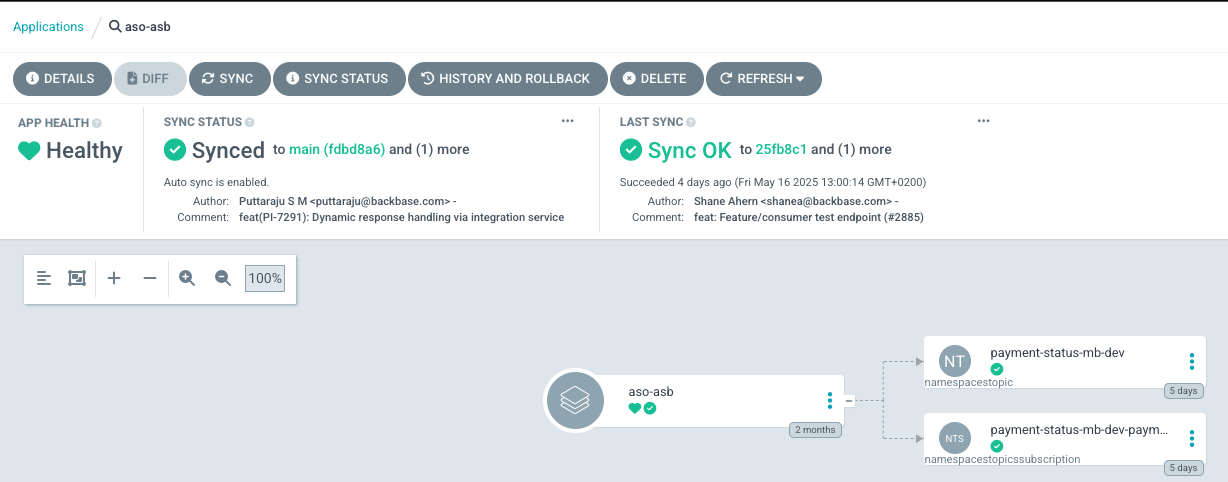
Producer deployment and configuration
The Sync Hub producer is a platform component that publishes payloads to topics on Azure Service Bus. It uses Spring Boot and the Azure Service Bus SDK.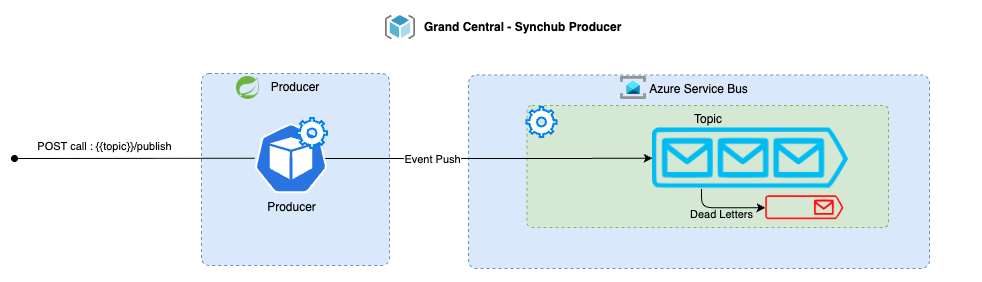
Deploy the producer
Deploy the producer to a Sync Hub-enabled environment throughgc-${org}-applications-live, the same way as any connector.
Use the chart versions available under the shared ACR:
gc-${org}-applications-live/${runtime}/apps/:
${CHART_VERSION} with the asb-producer chart version available in your shared ACR.
Required producer configuration
The producer uses the following configuration properties to communicate with Azure Service Bus.backbase.grandcentral.events.servicebus.fullyQualifiedNamespace
Sets the fullyQualifiedNamespace of the Azure Service Bus to connect to. Format: my-sb-namespace.servicebus.windows.net.
backbase.grandcentral.events.servicebus.activeTopics
Lists the topics this producer instance can publish messages to. At least one active topic must be present, otherwise the producer fails on startup.
Example value:
backbase.grandcentral.events.servicebus.sessionGroups.${topic}
Defines all session groups for a specific topic. Session groups ensure message ordering.
Example configuration for an account topic with two session groups:
Call the producer
Connector labels required
The producer accepts connections only through intra-cluster communication. Only connectors deployed in the same runtime can interact with it, and only after you configure these pod labels:app.gcservices.io/synchub-enabled: "true"app.gcservices.io/synchub-type: "producer"
connector.customLabels:
Service URL
Resolve the producer using the Kubernetes FQDN. For the example Application file, the release name isasb-producer, so the producer service is available at:
Producer endpoint
The service exposes aPOST endpoint for publishing to topics. Pass the topic name as a path variable.
The following table shows the producer endpoint pattern for each topic.
Required request headers
eventSource- The source of the generated event.eventVersion- The version of the event.identifier- The unique identifier of the target resource.traceParent- The unique tracing ID.
Optional request headers
bbEventType- Package path of the event handler used for Backbase SDK processing.traceState- Vendor-specific trace identification.
Example request
The following example shows the shape of a publish request. Thedata field contains the event payload, and its structure depends on the topic and event your connector publishes. The paymentTransaction payload is illustrative. Substitute the domain object that fits your event. For example, account, customer, or loanApplication.
Call the producer from an inbound connector
An inbound connector doesn’t need to construct the HTTP call by hand. You wire the connector to the producer through a small set of properties. The same code can then publish to any topic by changing configuration alone. The following table describes the properties for wiring a connector to the producer.
The connector builds the full endpoint as
${asb.producer.apiUri}/${asb.event.topic}/publish and sets the three event headers from the matching asb.event.* properties on every publish.
The following example shows an inbound connector publishing party updates to the party-updates topic:
identifier and traceParent on the outbound request itself, because they change for each event. The connector pod must also carry the labels described in Connector labels required before it can call the producer.
Consumer deployment and configuration
The Sync Hub consumer is a platform component that reads messages from Azure Service Bus and routes each message to APIM based on configuration. It uses Spring Boot and the Azure Service Bus SDK.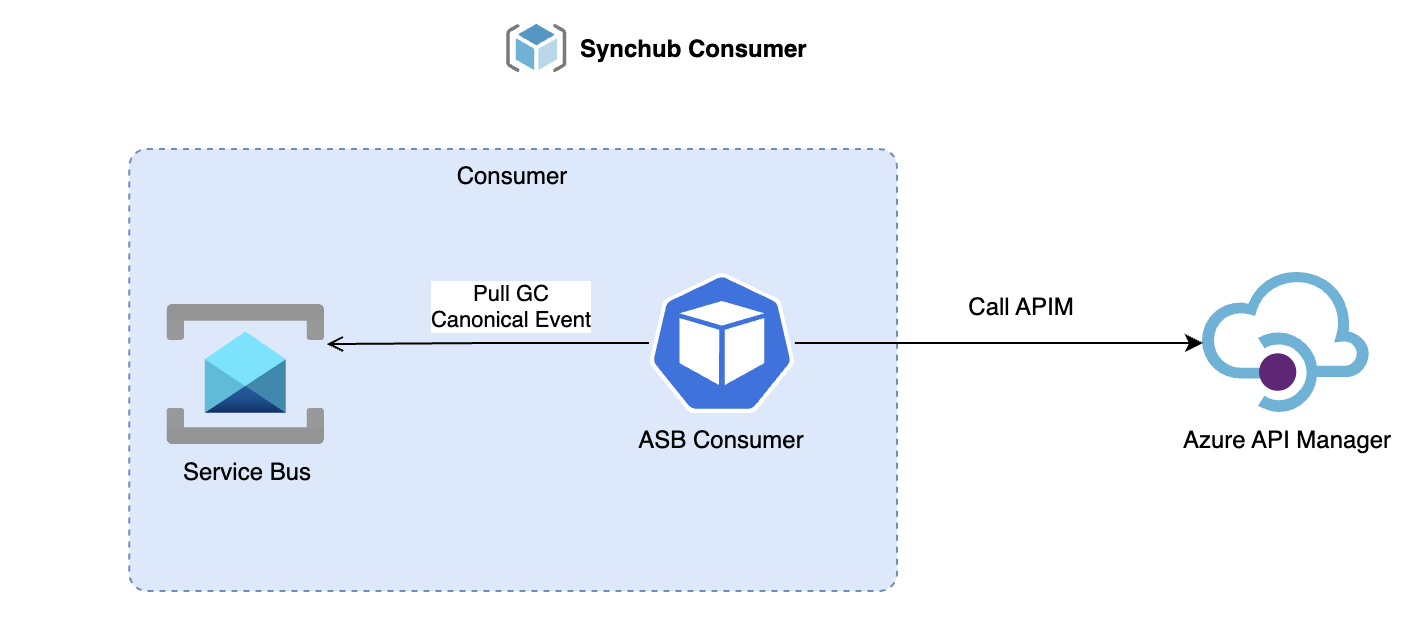
Deploy the consumer
Deploy the consumer to a Sync Hub-enabled environment throughgc-${org}-applications-live, the same way as any connector.
Use the chart versions available under the shared ACR:
gc-${org}-applications-live/${runtime}/apps/:
${CHART_VERSION} with the asb-consumer chart version available in your shared ACR.
Required consumer configuration
The consumer configuration falls into two main groups:- Azure API Management configuration.
- Azure Service Bus configuration.
Azure API Management configuration
backbase.grandcentral.apim.http.baseUrl
Base URL of the API Management Gateway. For example: https://api.stg.ecos.gcservices.io.
backbase.grandcentral.apim.http.subscriptionHeaderKeyName
Subscription key header value for APIM authentication. Defaults to api-key if you don’t define a value.
backbase.grandcentral.apim.topicEndpoints.${topic}.${topicSubscription}.outboundConnectorUrl
Configuration under topicEndpoints applies to a specific topic and subscription. The outbound connector URL supports variable substitution for flexibility on the APIM endpoint. Substitute ${id} for the identifier.
The following table shows URL pattern examples for the outboundConnectorUrl property.
You can configure separate connector URLs and APIM subscription keys for the same topic but different Azure topic subscriptions:
backbase.grandcentral.apim.topicEndpoints.${topic}.${topicSubscription}.httpMethod
The consumer supports two HTTP methods: POST or PATCH.
Azure Service Bus configuration
backbase.grandcentral.events.servicebus.fullyQualifiedNamespace
Fully qualified namespace of the Azure Service Bus, used to connect to the hosted Service Bus using managed identity. For example: my-sb-namespace.servicebus.windows.net.
backbase.grandcentral.events.servicebus.topicConsumers.${topic}.${topicSubscription}.numOfConcurrentSessions
Configuration under topicConsumers applies to a specific topic and subscription. Sets the number of concurrent sessions for the Azure Service Bus processor.
backbase.grandcentral.events.servicebus.topicConsumers.${topic}.${topicSubscription}.sessionEnabled
Boolean flag that sets whether the Azure Service Bus processor has sessions enabled for the topic subscription. The configuration must match the Azure Service Bus deployment. A mismatch in session configuration causes the processing client to fail.
Example event configuration
Troubleshooting
Session configuration mismatch
Session configuration mismatch
If the consumer fails to process messages, verify that the
session-enabled value in consumer.values.yaml matches the requiresSession value in servicebus.values.yaml for each subscription. A mismatch causes the processing client to fail.Producer startup failure — no active topics
Producer startup failure — no active topics
The producer fails on startup if
backbase.grandcentral.events.servicebus.activeTopics is empty or missing. Verify the property contains at least one topic name.Connector cannot reach the producer
Connector cannot reach the producer
Confirm the connector pod has both required labels:
app.gcservices.io/synchub-enabled: "true" and app.gcservices.io/synchub-type: "producer". Without these labels, intra-cluster network policy blocks the connection.ArgoCD sync failure for topics or subscriptions
ArgoCD sync failure for topics or subscriptions
Check the
aso-asb app in ArgoCD for the runtime. Common causes include invalid YAML in servicebus.values.yaml, missing Azure Service Operator CRDs, or insufficient permissions on the Azure Service Bus namespace.Next steps
- Sync Hub overview: Return to the Sync Hub overview.
- Integration patterns: Explore the five core integration patterns and when to use each.
- Use cases: See real-world examples of Sync Hub in action across banking scenarios.