

What a pack contains
Each pack bundles one or more connectors, along with the version and details you need to identify it. In the console, a pack shows:- The connectors it includes.
- How many of those connectors are deployed to your runtime, shown as a count such as
Deployed 3/4. - The health of each deployed connector.
Open a pack
The dashboard lists the packs deployed to your selected runtime. To see the connectors inside a pack, select the pack. The pack details view shows every connector in the pack and whether it’s deployed. A pack can include connectors that aren’t deployed to your runtime. This lets you see the full scope of a pack while still knowing what’s active in your environment. To investigate a single connector, select it from the pack details view. For more information, see Connector health and metrics.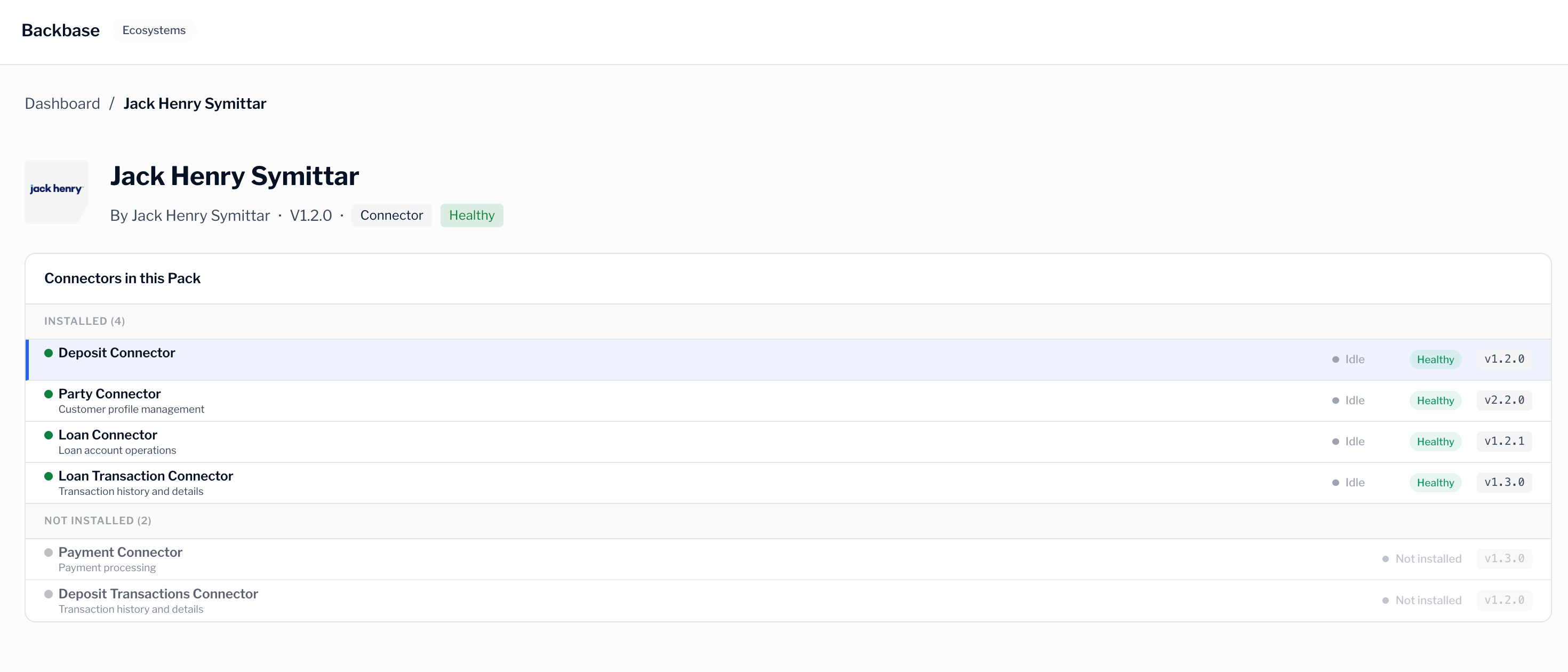
Deployed compared with available
It helps to keep two ideas separate:- Deployed packs run in your runtime now. You find these on the dashboard.
- Available packs are the packs you can explore in the marketplace, whether or not they run in your runtime.
Creating, versioning, and releasing packs is handled by a GC Admin. As an Admin or Viewer, you monitor the packs deployed to your runtime rather than build them.
Next steps
Browse the marketplace
Explore the packs available for your installation.
Monitor your integrations
Return to the dashboard to check deployed packs.